May 2, 2026
Using MLX and prompt caching for automated Pokémon card identification and grading
An automated Pokémon trading card scanner running locally on a 16GB Mac using MLX, prompt caching, and Qwen3.5-4B
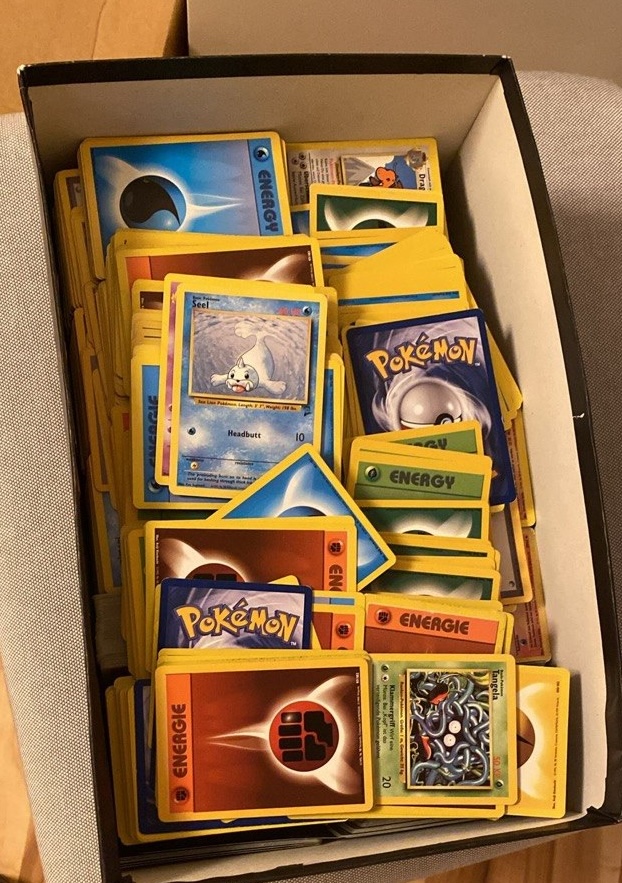
In the attic of my parents house, I recently found my old vintage Pokémon cards from the years 1999-2003.
I wondered if they are worth anything, but I have absolutely no idea about trading cards. In addition, the box contains around 2000 cards, and I was not really looking forward to looking up each of them on the internet.
Although there exist mobile apps that lets you scan and catalogue trading cards, they are either not free, had usage limits, or lacked some essential features (like automated 1st edition detection or approximate grading, see below).
However, I knew that there has been some recent open source vision-language releases (Qwen3.5 at that time) that, in combination with the right APIs, should allow me to build a small solution that lets me scan all cards relatively fast, and gives me an estimated price on the trading card market.
To actually be useful, the solution should fulfill some requirements though:
- It should run on consumer hardware, ie. my Mac M3 with 16GB memory. I do not want to spend a lot of money on cloud APIs.
- It should run fast, ideally less than 30s per card. Else there would be no advantage over looking up each card manually on the internet.
- It should be accurate enough so the human-in-the-loop effort is minimal. Again, else there is no efficiency gain by using this solution.
- It needs to give me the approximate price of each card
- It should work without me having to collect training data and train/fine tune a CV model.
Pokémon Trading Cards
The problem of identifying and grading Pokémon trading cards turned out to be more involved than I initially thought. This was mostly due to the following reasons:
Very large number of cards
The first Pokémon cards released in English appeared in 1999. Since then, there are more than 18k unique cards in the English language alone. These cards usually get released in sets, amounting to over 100 official Pokémon TCG sets in English, as well as hundreds of special set or promo collections.
Multilinguality
Cards do exist in different languages (in my box they were in German, English and Japanese), and some sets exist only in specific languages (like Base Set 2 in the English language only). The language of the card can thereby also have a strong effect on the price (see the next example).
Rarity
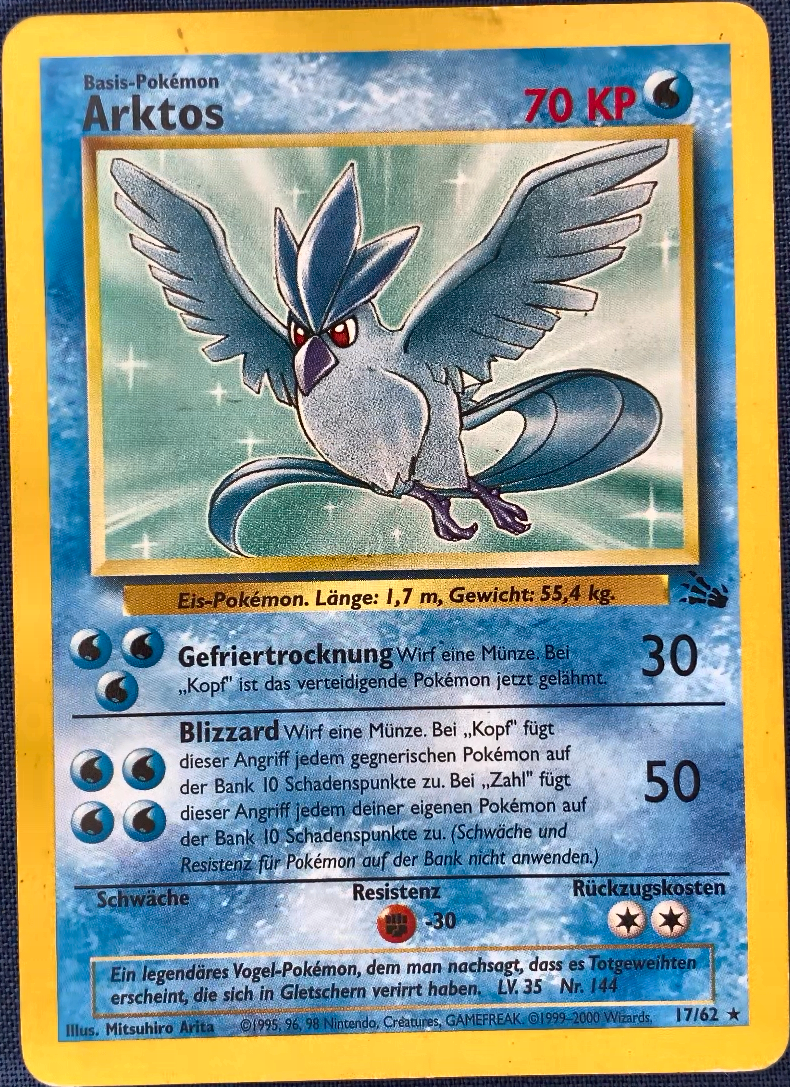
Pokémon cards do have a symbol at the bottom right corner of the card that indicates the rarity of the card:
- common ●
- uncommon ◆
- rare ★
See the two examples below for a common and a rare card.
The problem is that the rarity indicators are not always indicative of the value of the card. In the example below, the "common" card Misty's Tears in japanese is worth much more than the "rare" card Elekid. The Japanese version has a different illustration of Misty that collectors find more desirable.
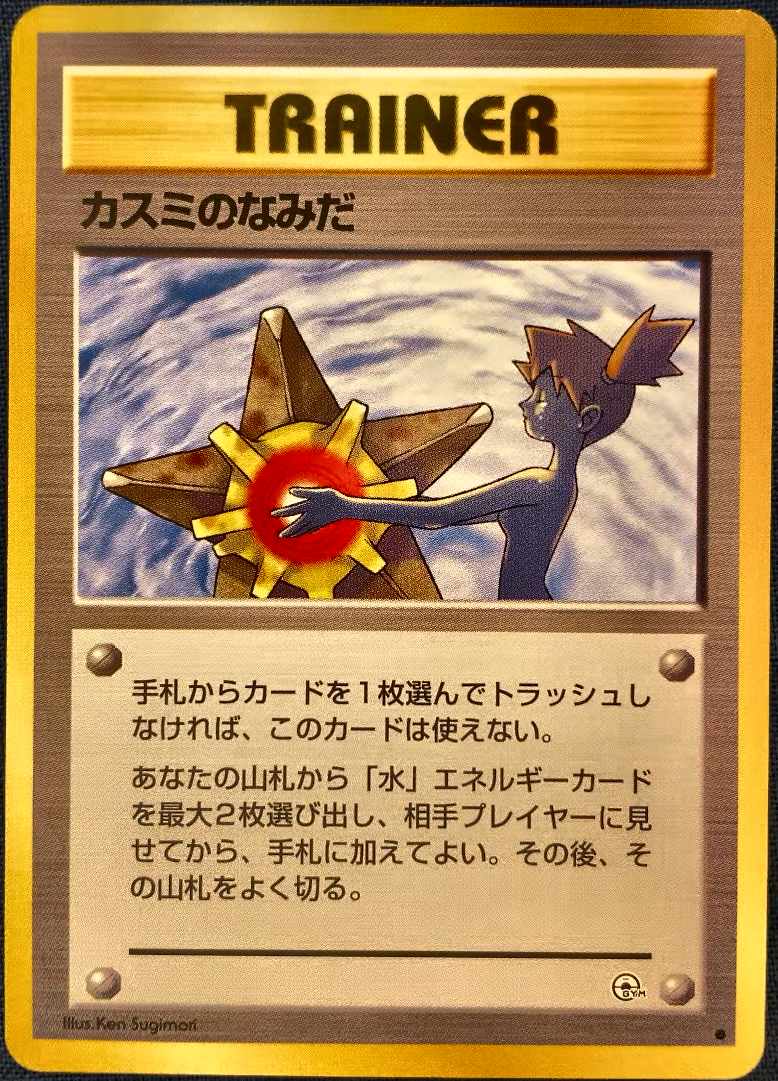
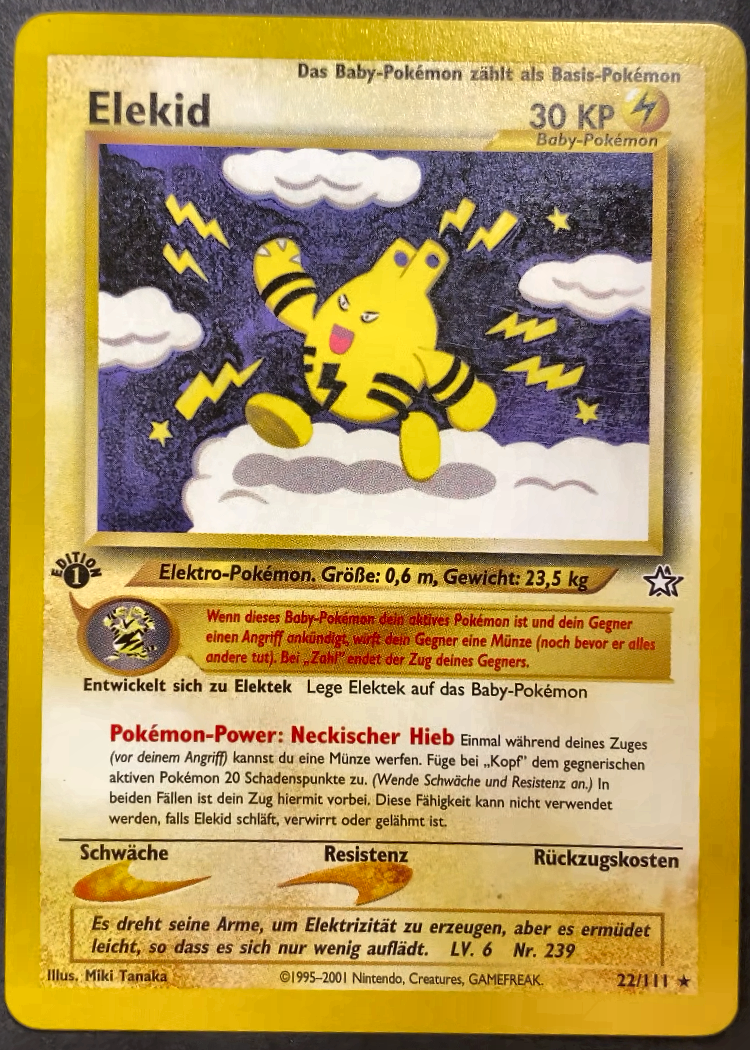
In addition, cards can be foil/holo, meaning they have a shimmering effect, which again has a strong effect on the price.
1st Edition
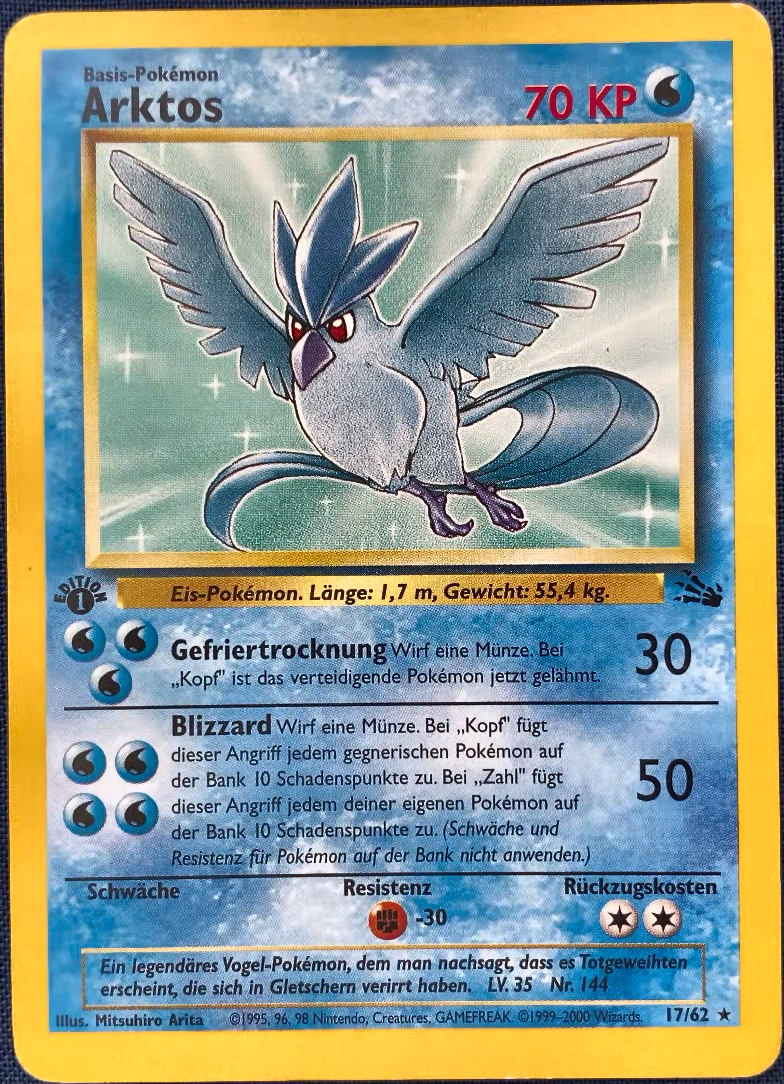
Some sets have so-called 1st edition cards, ie. cards that got printed during the first release of that set (Pokémon card sets prints and releases is a science in itself, which I am also not very familiar with). These cards have a small stamp with a 1 in a black circle with "edition" written around it, and are generally worth a bit more than the non-1st edition cards.
Grading
In addition to the identity of the card, its condition (also called grade) has a very large influence on the price people are willing to pay for it.
On trading card market platforms such as cardmarket.com, the grading is divided into seven distinct classes:
- MT (Mint)
- NM (Near-mint)
- EX (Excellent)
- GD (Good)
- LP (Light-played)
- PL (Played)
- PO (Poor)
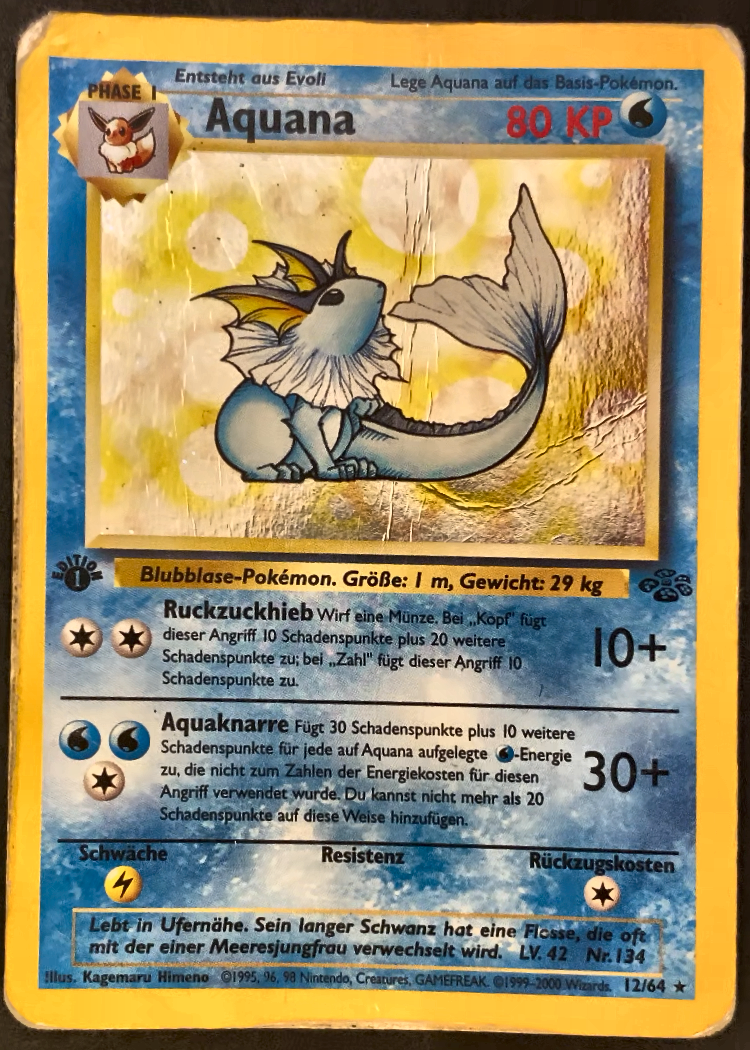
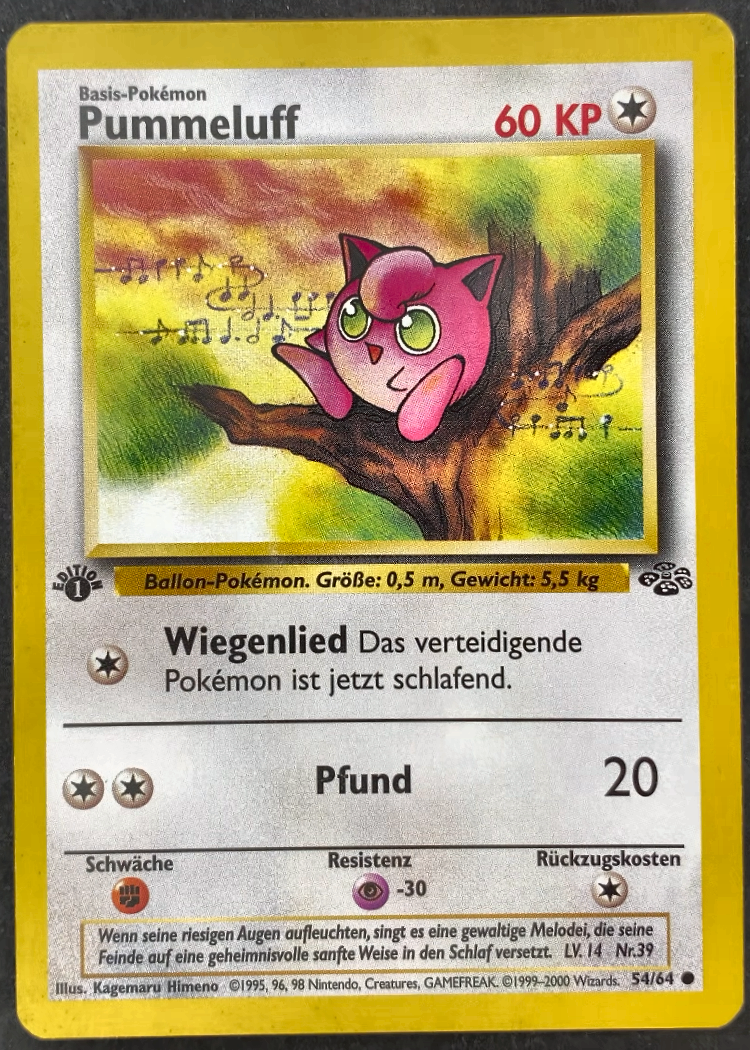
Near-mint (NM) thereby means the card is in new condition. For MT, additional printing-related features must also be optimal. Good, light-played and played cards typically have a different severity of edge whitening or scratches, and poor cards are typically heavily damaged. See the two examples below for a card in poor condition and a card in arguably excellent condition.
Note that for proper card grading, one usually uses different angles and viewpoints to be able to see scratches on the surface, especially when the card is foil. In addition, there are professional services that grade cards for you. However, for our purpose of getting a rough price estimate, I thought having a front and back scan of the card is sufficient.


Promo and special cards
Finally, there are many cards that are not part of the official Pokémon sets but are promotional cards that appeared in special promotional releases. Cards from official sets usually have the card number and the total set number printed on the card (see bottom right corner in the examples above). Promo cards sometimes do not have that, or just have a card number printed (see below).
This complicates the identification, and I will talk about this more below.

Now, note that there are many more specialities (like shadowless cards) that have an influence on the card price. For simplicity, and since these were not relevant for my collection of cards, I left them out of this card scanner solution.
The card scanner solution
For the card scanner solution, I use the following setup:
-
As a camera, I use the camera of my phone. Since it is an iPhone and I am building the solution on my Mac, I am using Continuity Camera to use the iPhone camera from my Mac.
-
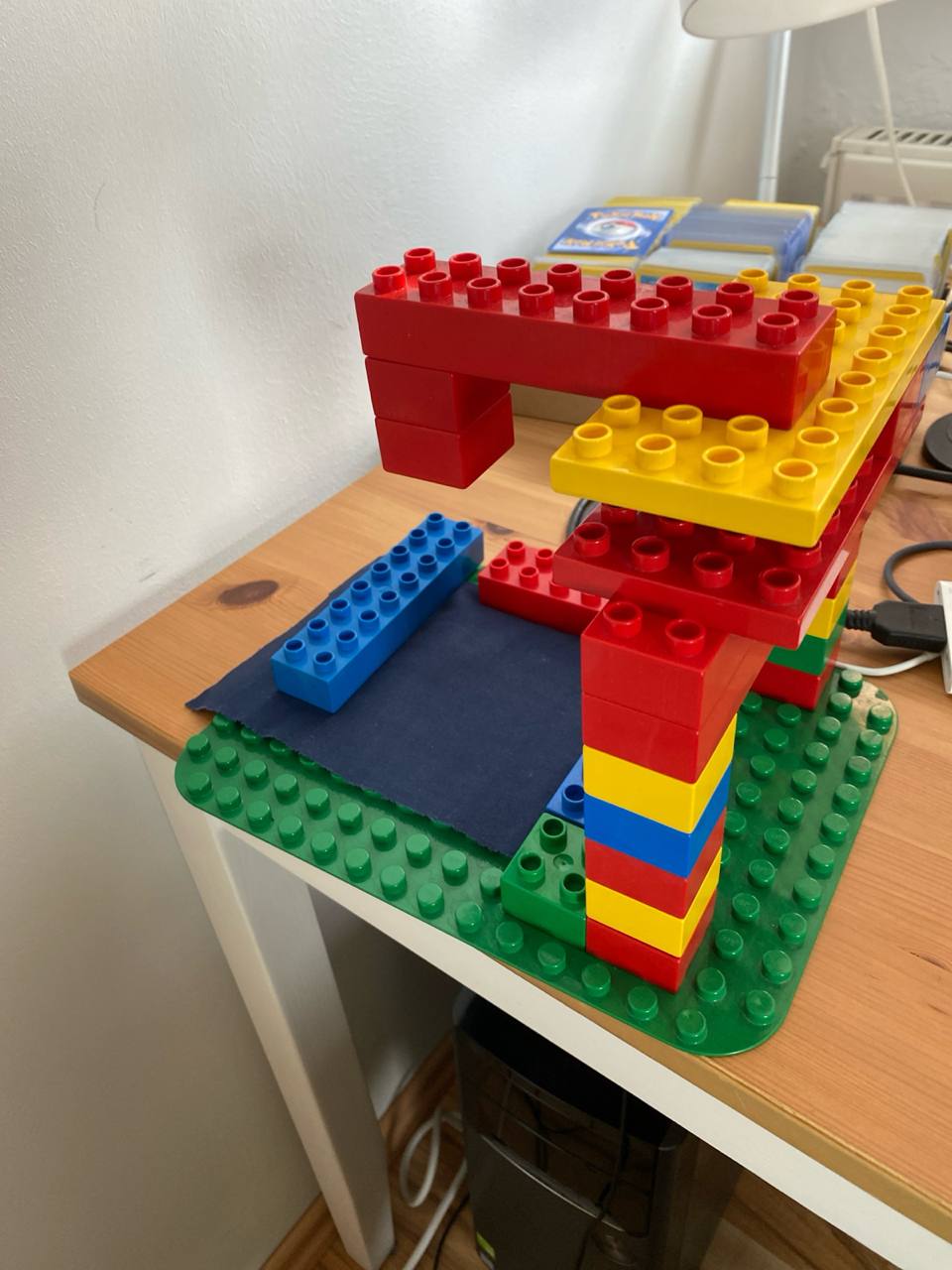
I built a small stand that holds my phone at the top, and has a flat surface on the bottom where I can lay the card. I use a dark fabric as a background so it is easier to observe whitening/the white edges on the cards.
Pipeline overview
The full pipeline takes the raw scan from the webcam and produces a structured record with the card's identity, condition, and an estimated market price. The full diagram looks like this:
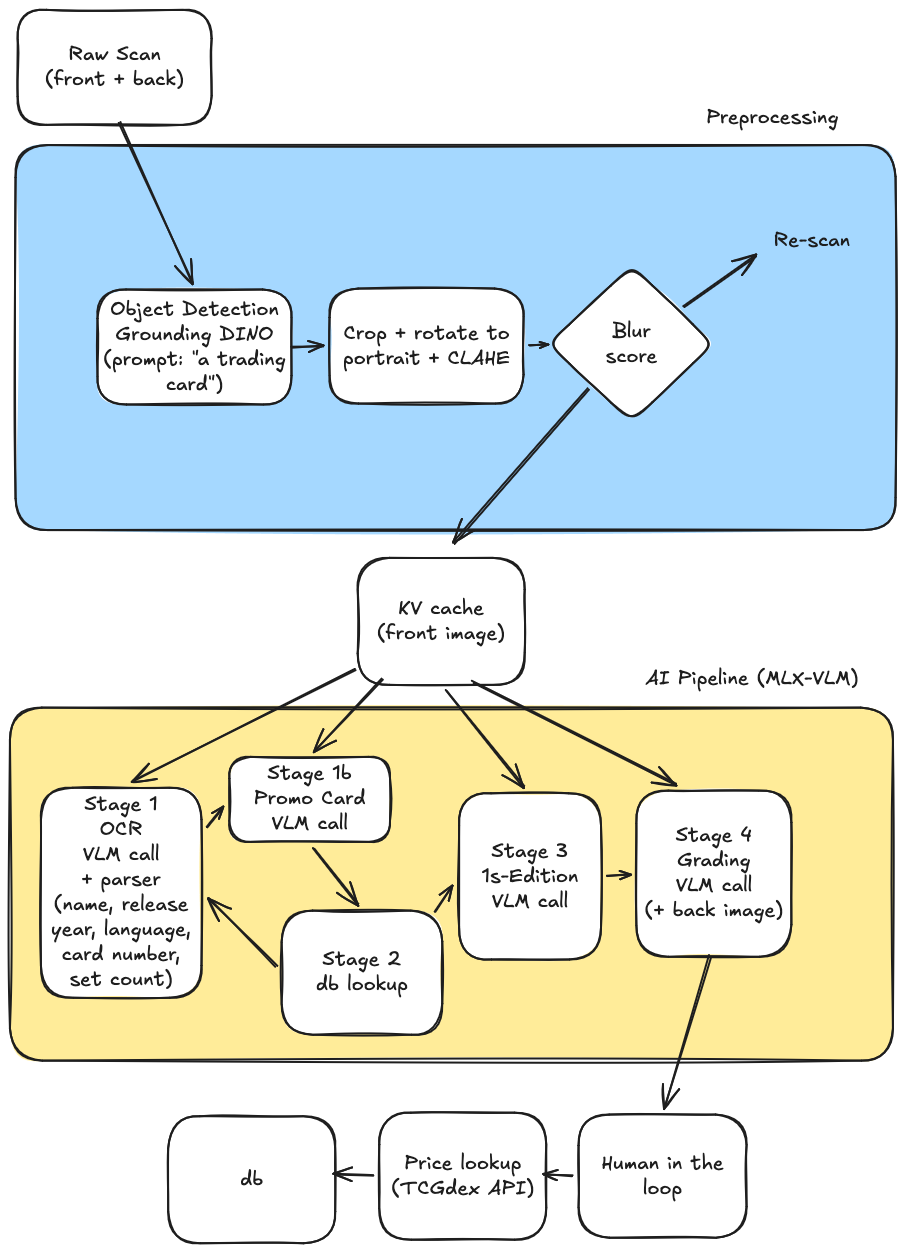
It splits into three logical phases:
- Preprocessing: isolates the card from the background and normalize its framing.
- AI pipeline (MLX-VLM): consists of four cached calls against Qwen3.5-4B-MLX-4bit running locally using MLX-VLM to extract identity, first-edition status, and a condition grade.
- Price lookup: maps the identity and grade to a Cardmarket price via the TCGdex reference data.
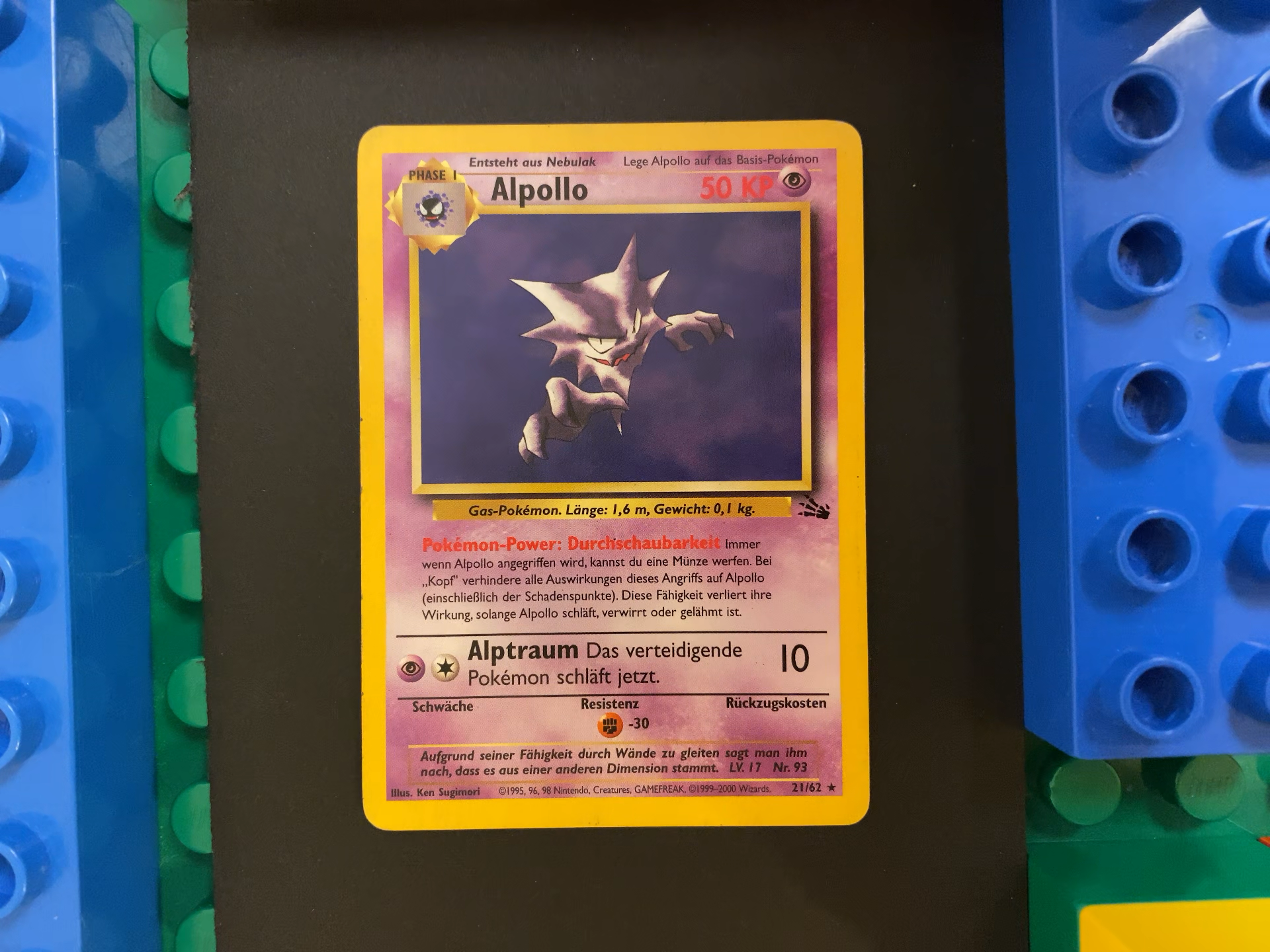
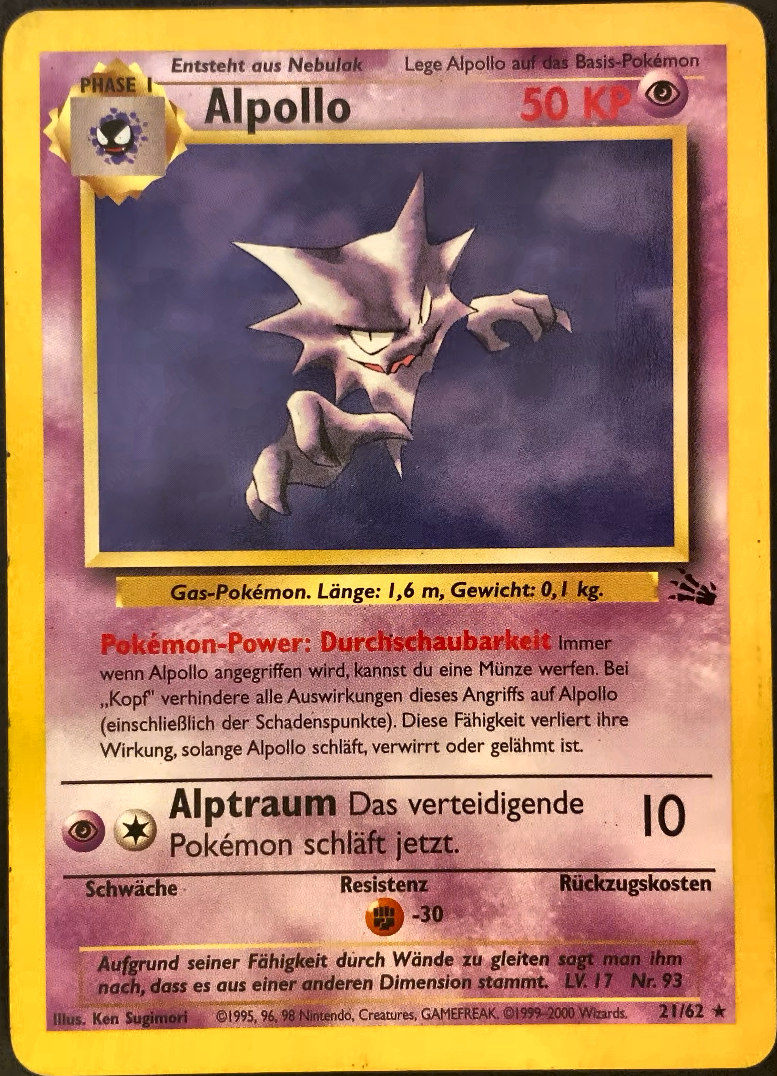
Below I walk through each step on a single card: a German Alpollo (the German name of Haunter) from the Fossil set.
The raw scan
The solution is built as a command line tool that opens an openCV window with the camera view upon starting. It indicates the view to be scanned (either front- or backside of the card) and waits for the user to press space, triggering the capture of the current camera frame. After scanning both the front and back this way, we have the raw images of the card.

Step 1 — Preprocessing
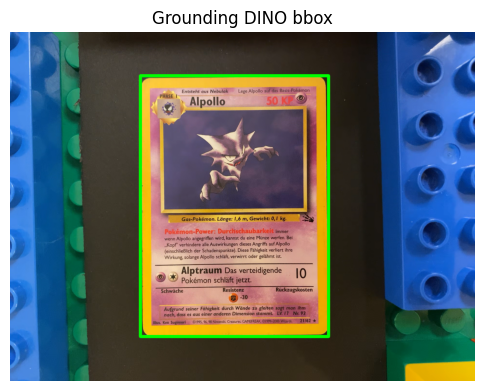
For preprocessing I use Grounding DINO, a zero-shot object detector that you prompt with a free-text label. The label here is simply "a trading card.".
Grounding DINO returns a bounding box around the card:
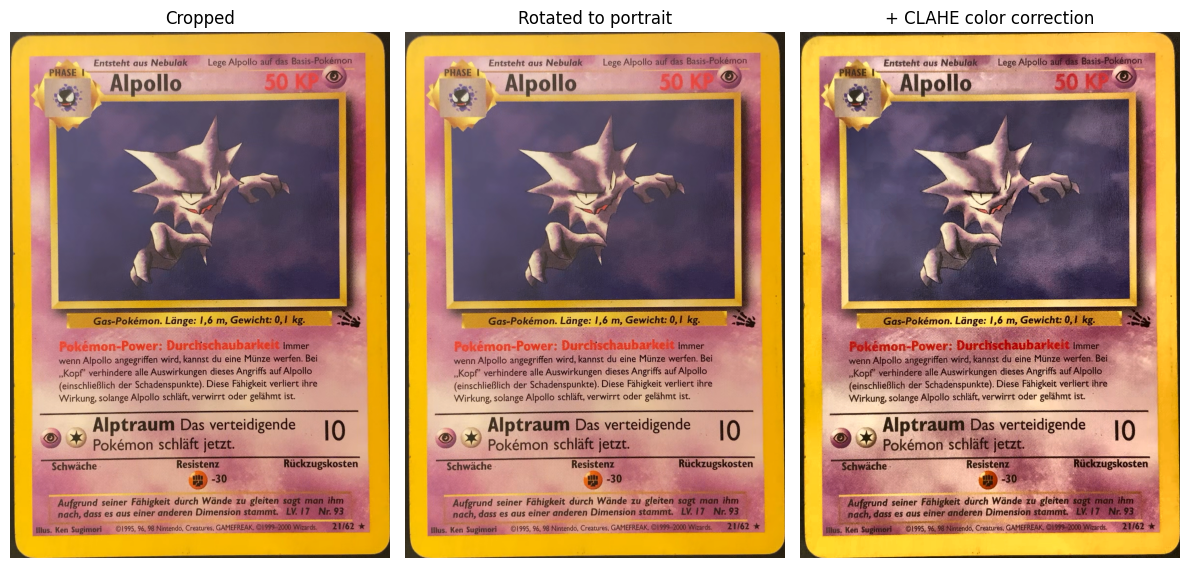
The full preprocessing pipeline then does four things on the cropped region:
- Detect — Grounding DINO bounding box.
- Crop — to the bbox.
- Rotate — if width > height, rotate 90° so the card is portrait.
- Color-correct — CLAHE on the LAB L-channel for local contrast. This makes the text as well as the edge whitening more visible later when the VLM grades the card.
The pipeline also computes a variance-of-Laplacian blur score on the cropped card. If it's below a threshold the scan is rejected and the user is asked to re-scan.
The outcome of this preprocessing are normalized front and back images:

Note that we want to keep the cutouts as small as possible so the VLM processing is as fast as possible. In addition, keeping high resolution is also important because else the VLM does miss some small text pieces on the card such as release year or card numbers on the bottom right, which are important.
Step 2 — AI pipeline on MLX
Everything downstream runs on Qwen3.5-4B (4-bit) via MLX locally on the Mac. The 4-stage pipeline calls the VLM multiple times against the same front image, so I prefill the image once into a KV cache and reuse it for every follow-up call. This avoids re-encoding the image on each call, which drastically speeds up follow-up questions.
I found Qwen3.5-4B (4-bit) to be a quite decent model for this task. Qwen3.5-9B (4-bit) does also fit into the 16GB memory but leads to slower inference without any quality improvements. Similarly, higher precisions (like 8-bit) did also eventually just lead to slower inference without adding much of a quality improvement for this usecase.
Note that we can begin building the KV cache based on the front image while the user still scans the back image, since we need the back image only for the grading stage and not for the identification stages.1
from card_scanner.ai.client import MLXClient
from card_scanner.config import MLXConfig

client = MLXClient(MLXConfig())
front_cache = client.prefill_cache([front_processed])
# KV cache prefilled in 4.38s
For the first scan, loading the model adds an additional ~10 seconds.
Stage 1 — OCR extraction
The first call asks the VLM to act as an OCR engine: "Return all text written on the card exactly as it appears." I deliberately avoid asking the model to identify the card or infer the set in this step.
I found it to be unreliable directly returning key features such as release year, card number and total set number from the image in a structured output format. This is mostly due to multiple year numbers being present on the card (bottom row of the card) and cards having other numbers very close to the card number. In the Alpollo example, the card number is 21 with the total set number being 62. However, there is a field "Nr. 93" very close to it. Directly asking for card/total set numbers often leads to confusing this 93 with any of the two, breaking the identification. Enabling thinking often solves this problem, but at the cost of much longer inference times. I therefore disabled thinking by default.
Instead, we just use the model as an OCR in the first stage, and use a pure-Python parser to extract structured fields out of the OCR text:
- game — keyword match (
Nintendo,Pokémon,GAMEFREAK→ pokemon) - language —
langdetecton the OCR text - release_year — max of
©YYYYcopyright matches - card_name — line immediately preceding an
HP/KP/PVmarker - card_number / set_size — the
N/Mcollector number - is_promo — true if there's a standalone number rather than
N/M
For the Alpollo card the OCR comes back like this:
PHASE I
Entsteht aus Nebulak
Lege Alpollo auf das Basis-Pokémon
Alpollo
50 KP
Gas-Pokémon. Länge: 1,6 m, Gewicht: 0,1 kg.
Pokémon-Power: Durchschaubarkeit Immer
wenn Alpollo angegriffen wird, kannst du eine Münze werfen. Bei
„Kopf" verhindere alle Auswirkungen dieses Angriffs auf Alpollo
(einschließlich der Schadenspunkte). Diese Fähigkeit verliert ihre
Wirkung, solange Alpollo schläft, verwirrt oder gelähmt ist.
Alptraum Das verteidigende
Pokémon schläft jetzt.
10
Schwäche
Resistenz
Rückzugskosten
Aufgrund seiner Fähigkeit durch Wände zu gleiten sagt man ihm
nach, dass es aus einer anderen Dimension stammt. LV. 17 Nr. 93
Illus. Ken Sugimori
©1995, 96, 98 Nintendo, Creatures, GAMEFREAK. ©1999-2000 Wizards.
21/62 ★
And the parser extracts:
game:         pokemon
language:     de
release_year: 2000
card_name:    Alpollo
card_number:  21
set_size:     62
is_promo:     False
Stage 1b — Promo detection (conditional)
Promo cards don't print a N/M collector number — they typically print just a single number (e.g. 21) and carry a black star with the word PROMO below the art. The OCR parser flags is_promo=True when it can't find a N/M pattern but does find a standalone number near the bottom.
Because that heuristic also fires for noisy OCR (when the denominator was misread, for instance), there's a focused VLM call that double-checks: "Does this card have a promo stamp?" If the VLM says yes, the lookup in Stage 2 routes through the promo-specific path (which searches across all promo sets rather than matching by printed_total). If the VLM says no, we do a correction OCR call.
For a normal card with a clean N/M collector number this stage is skipped entirely. For Alpollo:
OCR found a clean N/M collector number (21/62) — promo check skipped.
Stage 2 — Deterministic lookup
I don't ask the VLM to name the set. Instead I match against a local cache of TCGdex reference data using the pair (release_year, printed_total) - the denominator printed on the card. For non-English cards we then resolve the English name and rarity by looking up the same (set, number) in the English data.
Sets matching printed_total=62, year≈2000:
  - Fossil (FO, 1999) — printed_total=62

Identified card:
  set:      Fossil (FO)
  number:   21/62
  name:     Alpollo  (rarity: Selten)
  card_id:  base3-21
After normalisation (resolving the English name, mapping the raw rarity to the internal enum, detecting holo) the lookup result looks like this:
set_name:             Fossil
card_name_english:    Haunter
card_number:          21/62
rarity:               rare
is_foil:              False
first_edition_exists: True   ← gate for Stage 3
tcgdex_card_id:       base3-21
If this lookup fails there's a VLM correction fallback (re-prompt with the valid card numbers for the matched sets).
Stage 3 — First Edition detection
Only a handful of early WotC-era sets (Base Set, Jungle, Fossil, Team Rocket, Gym, Neo) have 1st Edition printings, and the difference between 1st Edition and Unlimited is a tiny 1 stamp. So this stage only runs when first_edition_exists is true on the matched set.
When it runs, it's a single cached VLM call with a focused prompt that asks only about the stamp:
First edition check in 2.69s
  is_first_edition: False
  explanation:      The card does not display the First Edition symbol
                    (a small black '1' inside a circle) in the bottom left
                    corner ... This card appears to be a later printing,
                    likely from the German version of the Pokémon TCG.
Stage 4 — Condition grading
I found this to be the hardest part to do for the VLM. While the identification worked for me in 99% of the cards (in 450 scanned German and English cards, I got 3 cards detected wrong. These all had a set number of 111, and the OCR confused the "/" sign as an additional one, returning 64/111 as 641111, for example).
I found asking the VLM directly for a letter grade (NM / LP / PL / ...) is unreliable, even when providing a lot of context in the prompt.
Rather, asking it to describe features of the card and have a Python-based scorer works better. So I split the task in two:
- The VLM reports categorical observations only: front and back edge whitening, corner wear, surface condition, creases, structural damage.
- A pure-Python scorer (
compute_grade) sums weighted wear points and maps the total to a grade via fixed thresholds. Creases cap the grade atPL, while major structural damage cap the grade atPO.
This call uses both front and back. The front is already in the cache, so we only send the back image as new input plus the grading prompt:
obs = client.chat(
    system_prompt=prompts.GRADING_SYSTEM,
    user_text=prompts.GRADING_USER,
    image_paths=[back_processed],   # front already cached
    prompt_cache=front_cache,
)
For Alpollo:
front_edge_whitening: none
back_edge_whitening:  moderate
corner_wear:          sharp
surface_condition:    pristine
creases:              False
structural_damage:    none
grading_notes:        Front shows clean edges with no visible wear.
                      Back has clear whitening along multiple edges,
                      especially noticeable on the left and bottom.
                      Corners are sharp. No creases or structural damage.

Computed grade: EX
Even with this setup I found that the grading is usually off by about one grade compared to my own assessment of the grade (which might also not be perfect), so I did a lot of manual intervention on the grade when scanning the cards.
Step 3 — Price lookup
TCGdex embeds Cardmarket (EUR) and TCGplayer (USD) prices with each card. Those numbers are baseline Near-Mint values, so I apply a condition multiplier on top:
| Grade | Multiplier |
|---|---|
| NM | 1.00 |
| EX | 0.80 |
| GD | 0.65 |
| LP | 0.50 |
| PL | 0.35 |
| PO | 0.20 |
Note that this heuristic is rather a quick hack and might not always reflect actual cardmarket prices, ie. NM, if officially grade, can be substantially more expenive than a non-graded EX version of the card.
verified:   True
price_eur:  4.76 EUR  (after EX multiplier)
source:     tcgdex
Final result
End-to-end, one scanned card becomes one structured record ready for Cardmarket export:
| Field | Value |
|---|---|
| Name (EN) | Haunter |
| Name (printed) | Alpollo |
| Set | Fossil (FO) |
| Number | 21/62 |
| Language | de |
| Rarity | rare |
| Foil | False |
| 1st Edition | False |
| Condition | EX |
| Price (EUR) | 4.76 |
The whole walk through takes around 30 seconds for a single card on a 16GB M3 Mac, with the grading dominating the budget. Loading the model is a one-time ~10s cost at the start of a scanning session.
Footnotes
-
In principle, exploiting prefix caching, one does not have to build the KV cache manually when using the same prompt structure in subsequent model calls. However, at the time of writing, MLX-VLM does not support prefix caching yet, in contrast to Ollama or cloud APIs, for example. ↩